Enroll a student / add to the registry
Add a student — either an existing FlexWelder user or a brand-new one (who gets an activation email) — and enroll them into a course right away or only add them to the center's registry (no course).
When to use
To enrol someone into a course from the central Students area — or to add a person to the registry "for later", before they pick a course (e.g. a future student, a referral). (You can also enrol from inside a course/edition's Students tab — see Course editions.)
Where
- Sidebar: Students → New Student
- URL:
/partner/students/new - Roles: Owner / Admin / Manager / Employee (Employee — adding to the registry only).
Step-by-step
- Open "New Student" (heading "Add Student").
- In the "Course (optional)" field pick a course — or keep the first option, "No course - registry only"
(the edition fields and "Practical subgroup" then stay hidden). The list contains only active courses with
at least one edition open for enrollment.
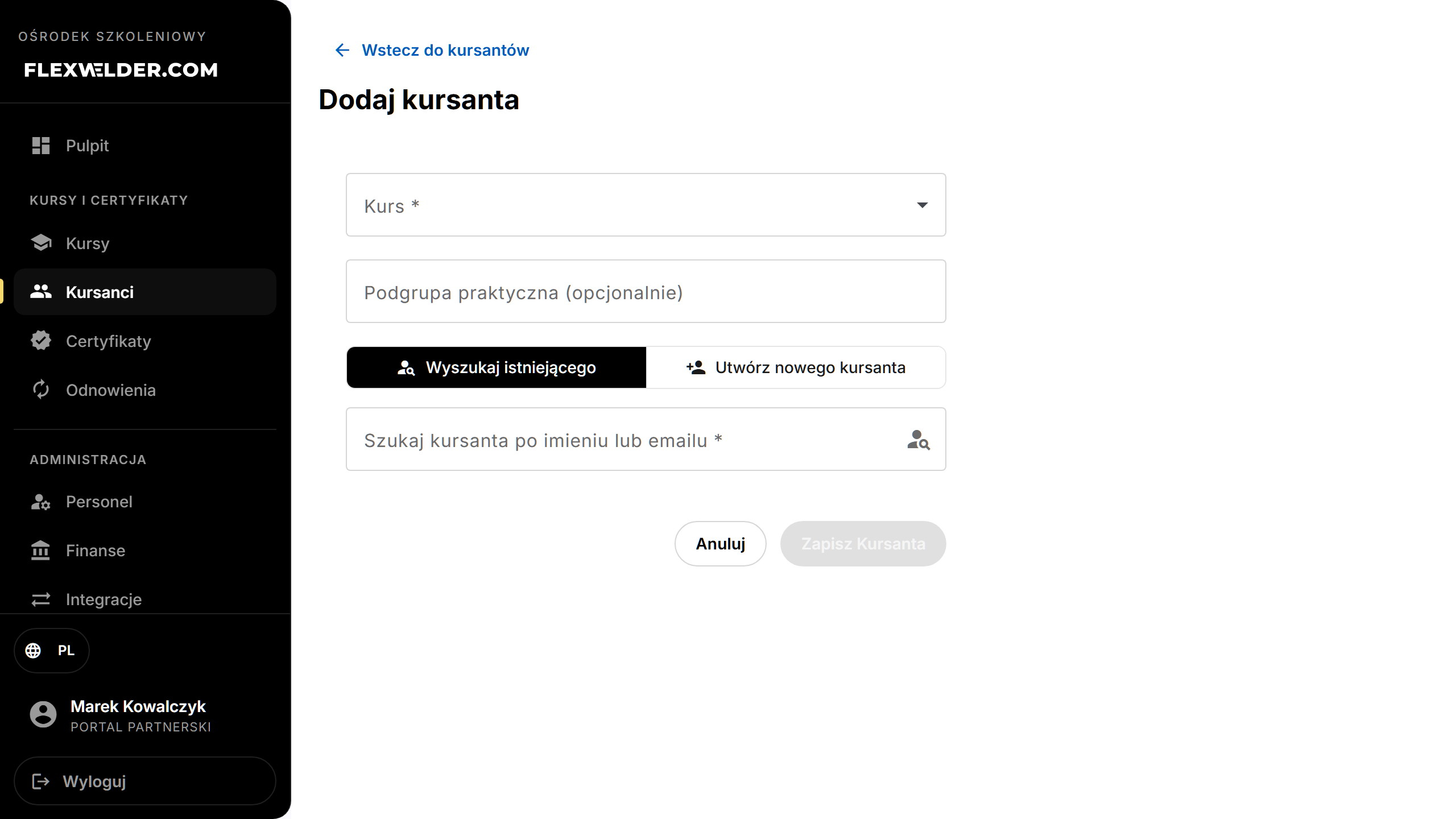
- Choose a mode with the toggle: "Search existing" or "Create new student".
- Search existing: type ≥2 characters in "Search student by name or email", pick the person, then click "Enroll Student" (in no-course mode: "Add to registry").
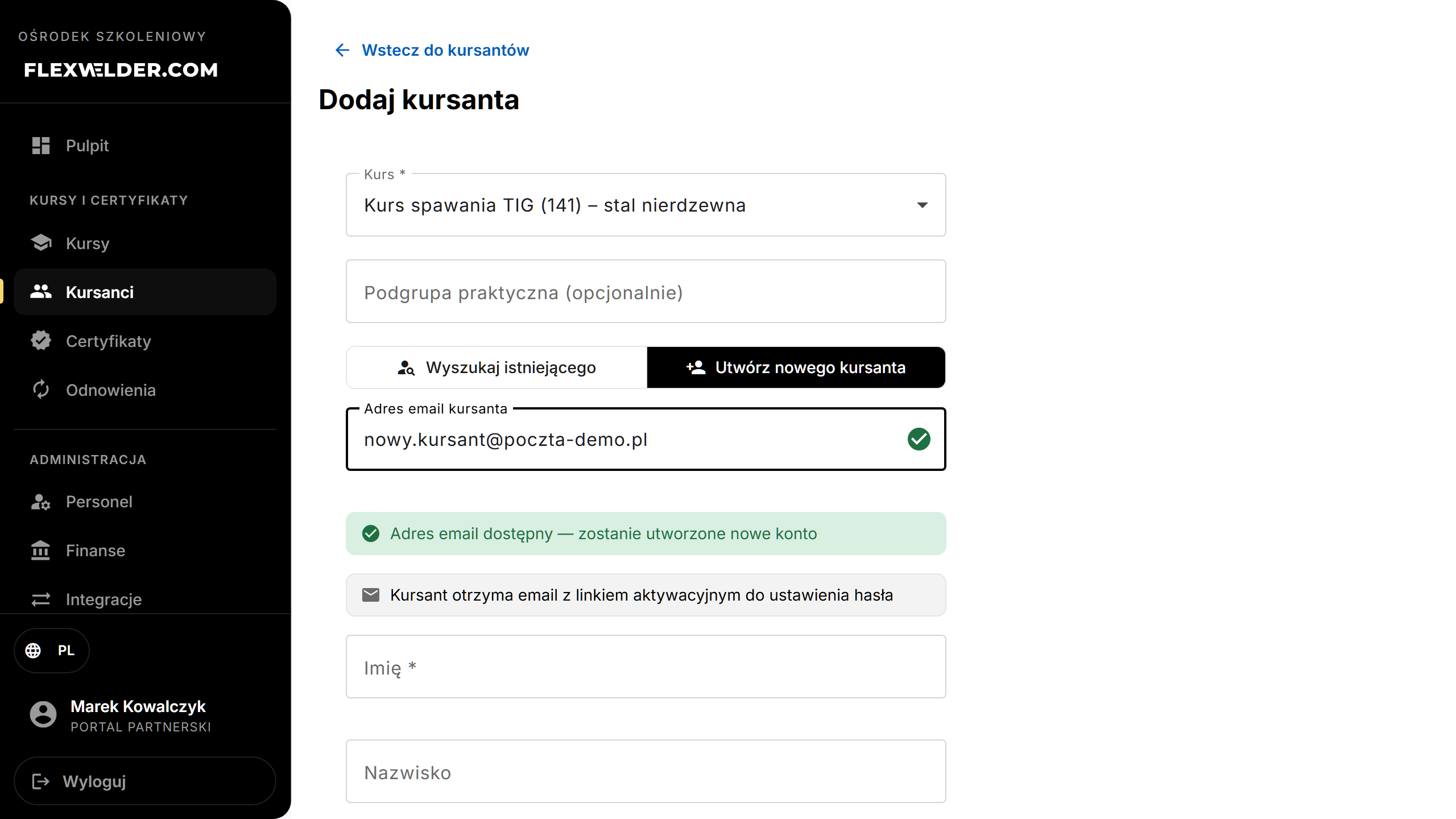
- Create new student: type the email. The field checks live:
- Already registered → an amber warning appears with "Switch to search" (use the existing account instead).
- Available → a green check + the note "a new account will be created" and an activation-email notice; fill
"First Name *", "Last Name", "Phone", then click "Create and enroll" (in no-course mode:
"Create and add to registry").
The Employee role sees this form in registry mode only — instead of the course picker it shows the note: "The student will be added to the center's registry. An administrator or manager will enroll them into a course."
Fields & validation
| Field | Required | Notes |
|---|---|---|
| Course | no | "No course - registry only" adds the person without an enrollment; pick a course later. |
| Practical subgroup | no | Free text; for splitting practical groups. |
| Search (existing mode) | yes | Must select a user from the results. |
| Email (create mode) | yes | Must resolve to available (not already registered). |
| First Name (create mode) | yes | Required to create the account. |
| Last Name / Phone (create mode) | no | Optional. |
What happens / outcome
- Existing user: enrolled immediately — toast "Student enrolled" — and you return to the students list.
- New user: the account is created, the student is enrolled, and an activation email is sent — toast "Student created and enrolled. Activation email sent." The student stays "Pending activation" until they set a password.
- Registry mode: the person lands on the students list with the "No course" and "In registry" markers — toast "Student added to the registry" (or "Student created and added to the registry. Activation email sent."). If the person was already there: "This student is already in the center's registry".
Edge cases & errors
- Email already registered: you can't create a duplicate — switch to search and pick the existing person.
- Enrolling into a full edition (when enrolling from inside an edition) queues the student to the waitlist instead. See Course editions.
- Enrollment failures show a toast with the server message.
Related flows
FAQ
- Will the new student get a login? Yes — an activation email lets them set a password. Staff can also issue a temporary password from the student's profile.
- Can I enrol into a specific edition? From this page you pick the course; to target an edition, enrol from that edition's Students tab.
- Why add a person without a course? The registry collects the person's data (and their certificates) before they pick a course — you enrol them later from their profile or from an edition.